Tailoring Your Alert Configurations
Not all dropping odds alerts are created equal. Learn how to configure your filters to focus on high-quality value bets and filter out the noise.
Fair Odds Terminal provides powerful filters that let you customize exactly what alerts you see. This guide explains each filter and how to optimize them for your strategy.
Why Filter Configuration Matters
Without proper filters, you'll be overwhelmed with alerts. Most won't be actionable:
- Odds may have already adjusted at soft bookmakers
- The market may have low liquidity
- The EV% may be too small to matter
- The match may be too far in the future
Good filter configuration means seeing fewer alerts, but higher quality ones.
Filter 1: Minimum Drop Percentage
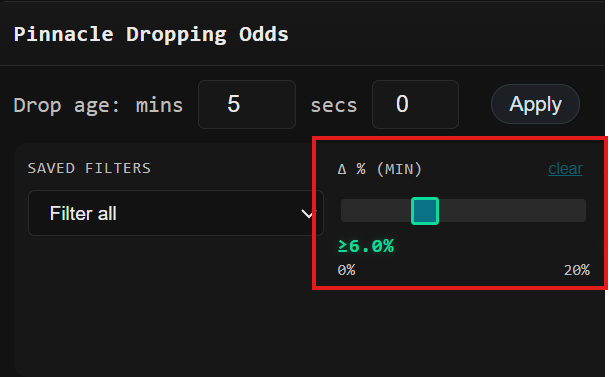
This filter sets the minimum percentage the odds must drop to trigger an alert.
Settings Guide
| Value | Result | Best For |
|---|---|---|
| 3% | Many alerts, some noise | High volume strategy |
| 5% | Balanced alerts | Most users |
| 7-10% | Fewer, stronger signals | Quality focus |
| 10%+ | Only major moves | Very selective |
Recommendation: Start at 5%. Adjust based on how many alerts you can handle.
Filter 2: Odds Range
This filter limits alerts to odds within a specific range.
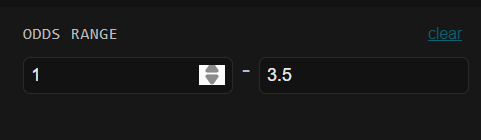
Why Odds Range Matters
- Very low odds (1.01-1.30): High win rate but small edge, large variance
- Low-mid odds (1.30-2.00): Good balance of win rate and edge
- Mid odds (2.00-3.00): Classic value betting territory
- High odds (3.00+): Lower win rate, higher variance
Recommended Ranges
| Strategy | Odds Range | Notes |
|---|---|---|
| Conservative | 1.30 – 2.00 | Higher win rate, steadier growth |
| Balanced | 1.50 – 3.00 | Good mix of opportunities |
| Aggressive | 1.20 – 5.00 | Maximum opportunities, higher variance |
Filter 3: Max Bet Range
This filter sets the minimum Pinnacle max bet for the market. Higher max bet = more liquidity = more reliable lines.

Understanding Liquidity
| Pinnacle Max Bet | Liquidity | Line Reliability |
|---|---|---|
| < $500 | Very Low | Lines can be unreliable |
| $500 - $2,000 | Low | Proceed with caution |
| $2,000 - $10,000 | Medium | Generally reliable |
| $10,000+ | High | Very reliable lines |
Tip: Set minimum to $1,000+ to filter out unreliable markets. Low-liquidity markets often have erratic line movements that don't indicate real value.
Filter 4: Time Before Match Start
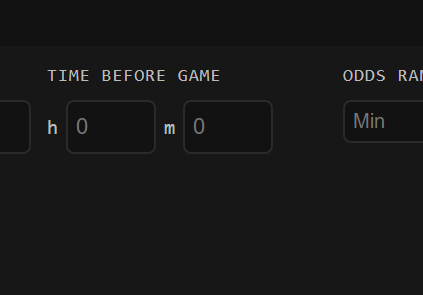
This filter shows only matches starting within a certain timeframe.
Why Timing Matters
- Close to start (< 6 hours): Lines are most stable, less time for correction
- Same day (< 24 hours): Good balance
- 2 days (< 48 hours): More opportunities, but lines may shift
- 1 week (< 168 hours): Maximum alerts, but high chance of line movement
Recommended Settings
| Time Window | Best For |
|---|---|
| 6 hours | Active monitoring, quick execution |
| 24 hours | Daily routine checking |
| 48 hours | Balanced approach (recommended start) |
| 7 days | Early value hunting |
Filter 5: Minimum Drop Percentage
This filter shows only alerts where the odds drop exceeds a certain percentage threshold.
Drop % Thresholds
| Minimum Drop % | Alert Volume | Quality |
|---|---|---|
| 3% | High | Many alerts, some noise |
| 5% | Medium-High | Good balance |
| 7.5% | Medium | Strong signals only |
| 10%+ | Low | Major moves only |
Note: A larger drop % indicates stronger sharp money movement. However, always verify that value still exists at soft bookmakers before betting.
Filter 6: NVP Method
This filter lets you choose which NVP calculation method to include in your alerts.
Available Options
| Method | Description | Accuracy |
|---|---|---|
| Power Method | Uses all market sides (2-way or 3-way) for precise NVP | High — Most accurate |
| Approx 5% | Estimates NVP using 5% vig assumption when opposite side unavailable | Medium — Less reliable |
Recommendation: Filter for "Power Method" only. This ensures the NVP you see is calculated from actual market data, not estimated.
Filter 7: Timing (Pre-match / Live)
This filter lets you choose between pre-match events, live events, or both.
Options
| Setting | Description | Best For |
|---|---|---|
| Pre-match | Only events that haven't started yet | Most users — more time to act |
| Live | Only events currently in progress | Advanced users — faster execution needed |
| Both | All events regardless of status | Maximum opportunities |
Note: Live events move faster. Value windows close quickly during games. Pre-match is recommended for beginners.
Filter 8: Drop Age
This filter sets how old an alert can be before it's hidden.
Why Freshness Matters
Old alerts are often stale:
- Soft bookmakers may have already adjusted
- The value window has closed
- You're chasing opportunities that no longer exist
Recommended Settings
| Max Age | Use Case |
|---|---|
| 1-3 minutes | Aggressive, real-time trading |
| 5 minutes | Active monitoring (recommended) |
| 10 minutes | Casual checking |
| 30+ minutes | Review mode only |
Preset Configurations
Preset 1: Stable EV (Recommended Start)
| Setting | Value |
|---|---|
| Drop age | Max 5 minutes |
| Timing | Pre-match |
| Min drop % | 7.5% |
| Sports | Soccer, Basketball, Tennis |
| Markets | Moneyline, Spreads, Totals |
| Odds range | 1.00 – 3.00 |
| Max bet range | $100 – $100,000 |
| Time before game | Max 48 hours |
| NVP Method | Power Method |
Preset 2: Volume Focus
| Setting | Value |
|---|---|
| Drop age | Max 10 minutes |
| Timing | Both |
| Min drop % | 3% |
| Sports | All |
| Odds range | 1.20 – 5.00 |
| Max bet range | $500+ |
| Time before game | Max 7 days |
Preset 3: Quality Only
| Setting | Value |
|---|---|
| Drop age | Max 3 minutes |
| Timing | Pre-match |
| Min drop % | 10% |
| Sports | Soccer, Basketball |
| Odds range | 1.50 – 2.50 |
| Max bet range | $5,000+ |
| Time before game | Max 24 hours |
| NVP Method | Power Method |
Building Your Own Configuration
Step 1: Start with Stable EV
Use the Stable EV preset for your first week. This gives you a baseline.
Step 2: Track Your Results
Log every bet and note which alert types perform best for you.
Step 3: Adjust One Variable at a Time
Change one filter, observe results for a week, then adjust again.
Step 4: Save Your Custom Presets
Once you find configurations that work, save them as custom presets.
Summary
Key filters to configure:
- Minimum drop % — Filter signal strength
- Odds range — Match your risk tolerance
- Max bet range — Ensure market liquidity
- Time before start — Balance opportunities vs. execution
- NVP Method — Power Method for accuracy, or include Approx 5% for volume
- Timing — Pre-match for beginners, Live for advanced users
- Drop age — Keep alerts fresh and actionable
Remember: Better filters = fewer alerts = higher quality opportunities. It's better to miss some value bets than to chase stale or marginal ones.